
Rocksolid AR Studio 25.4 Brings Physically Based Rendering, Support for Stereoscopic Displays, Dynamic Resource Allocation, and more
The new Rocksolid AR Studio 25.4 release delivers major upgrades focused on giving you the best visual quality and the most consistent performance. New features include Physically Based Rendering (PBR), stereoscopic rendering for stereoscopic HUDs and AR glasses, Dynamic Resource Allocation for smoother user experience. Below you can find a list of the main new features.
Physically Based Rendering Creates Photorealistic Results
Achieving true realism in AR requires materials that react to light as they would in the real world. The latest Rocksolid AR release introduces support for Physically Based Rendering (PBR) materials. Core PBR properties and lighting utilize glTF format, eliminating the need for complex workarounds in external tools like Blender. It takes care of the underlying physics, so your materials appear consistent and visually accurate under any lighting conditions.
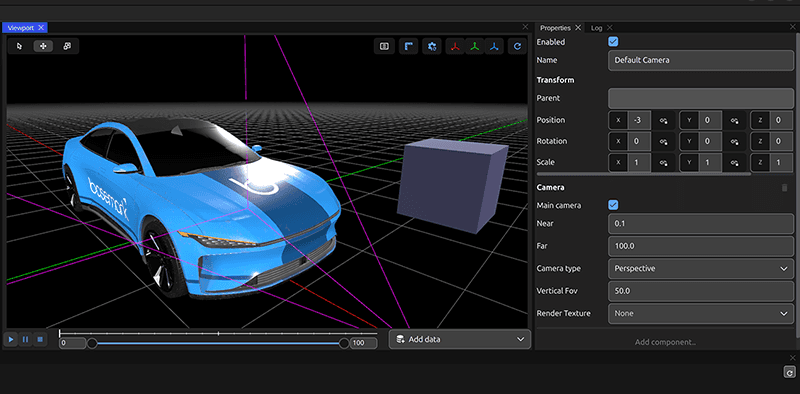
PBR reference template
Stereoscopic Support for a True 3D Experience
We are bringing true 3D to your AR applications. By supporting stereoscopic cameras, Rocksolid AR Studio can now simultaneously render a scene for two displays, mirroring how the human eye perceives the world. This new feature delivers proper support for stereoscopic HUDs and AR glasses and significantly enhances depth perception. The result is superior experience for truly immersive applications that provide a realistic 3D experience. Rocksolid AR Studio includes a reference project for stereoscopic displays.
Video: https://www.youtube.com/watch?v=ffp3GRWriww
Stereoscopic Camera Anaglyph Preview
Uninterrupted Application Execution with Dynamic Resource Allocation
Keep your applications flowing consistently without hiccups and interruptions. The dynamic resource allocation feature significantly improves usability and productivity. You can now see the changes you make instantly, eliminating lag and removing the need to reboot the project to reflect updates. Want to learn more about Rocksolid AR Studio? Book a demo with us here. If you are already a user and want to see the full list of new features and fixes in this release, check out the official 25.4 release notes.

